
 Introduction
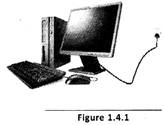
Computer is an electronic device. It requires electricity to work. Computer should be connected to a power socket for supply of power.
 Other Devices
 UPS
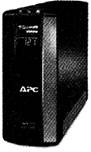
UPS is an uninterrupted power supply, also called uninterruptible power source. It is an electrical apparatus us which provides emergency power to a load when the input power source, typically the utility mains, fails. UPS keeps the computer ON for sometime even after the electricity goes OFF.
 Computer Cables
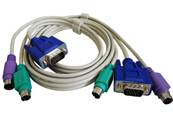
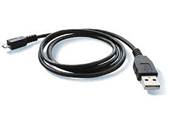
Computer cables are used for supplying power and commands to computers.



 Abbreviations
I/O - Input/output
CD ROM - Compact disk read only memory
 Data Storage Devices
After creating any document/image, you need to store them in the computer. Computer stores the information in storage devices i.e. hard disk.
 Floppy Disk Drive
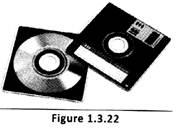
Floppy disk is a common permanent storage media that is used for storing and transporting data from one A floppy disk is composed of a disk of thin, flexible magnetic storage medium encased in a square or rectangular plastic shell. Floppy disks are read and written by a floppy disk drive or FDD. Floppy disks are available in different sizes, these are available in 8-inch (203 mm),
 inch (133 mm), and
 inch (89 mm) formats.
 Hard Disk Drive
Hard disk is a permanent storage media which is used for storing the huge volume of data.
 CD ROM Drive
CD-ROM drive is used to read the information from a CD-ROM player can be either internal or external. CD-ROM is an acronym of "Compact Disc Read-Only Memory It is a type of optical disk capable of storing large amount of recorded digital data. It is a pre-pressed compact disc for data storage.
 Digital Versatile Disk
 (DVD) is a high capacity data storage disk.
 USB Flash Drive or Thumb Drive
USB flash or thumb drive is a portable memory storage device.

 Introducing the Output Devices
Did you know! A computer only understands electronic pulses. Computer converts instructions into electronic pulses and processes it using the CPU. After processing the data, it converts the electronic pulses to user understandable form using the output devices. Output devices give the information in the form of picture, sound and text.
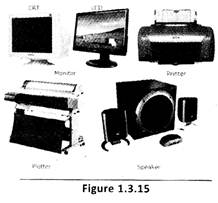
 The following are the common output devices:
 Monitor
 is also called the Visual Display Unit of the computer.
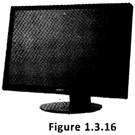 Monitors are classified into the following types:
 Printer
This is the output device which is used for printing the text and images. The following are the different types of printers:
Inkjet Printer
An inkjet printer is a type of computer printer that prints triages using ink cartridges creates a digital image by propelling droplets of liquid material (ink) onto a page. Inkjet printers are the most common type of printer.
 Dot matrix Printer
It creates images in dots and prints slowly. (See Figure 1.3.19)
 Laser Printer
It uses laser beam to print the pages by heating. It is faster than Dot Matrix and inkjet printers. (See Figure 1.3.20)
 Speaker
 is an electronic device which is used to hear the sound sing a computer. When you play a sound using a computer, it gives instruction to inverts the electronic data in the form of sound and sends it to weaker. (See Figure 1.3.21)

 Input Devices
Devices which are used for entering data into a computer are called input devices. Some devices are used for both inputs as well as outputs are called input output devices.
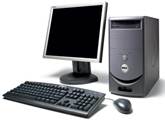
 The following are the common input devices:
 Mouse
Mouse is a pointing device that is used to control the movement of the cursor or pointer on a display screen. When mouse is rolled on a flat surface, the mouse pointer on the screen also moves in the corresponding direction. The movement of the mouse ball is translated into signals that tell the computer how and where to move the screen pointer.
 Keyboard
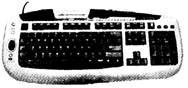
 is a typewriter like input device. It allows you to passing your data or instruction into the computer.
 Joystick
 is a control device that enables a user to move an object on the screen.
 Scanner
A scanner is a device that is similar to a Photocopier. The scanner copies pictures and photographs into the computer. Just as a photocopier prints the given printed image/page on a paper, a scanner creates an electronic form of the printed image which can then be manipulated, changed and modified according to the requirement.
 Light Pen
 is a small pen shaped light sensitive wand. The light sensor senses the light emitted from a limited of view when it comes in front of a graphic element or object of the screen.
 Barcode Reader
Bar code reader is an input device used for scanning the information which is printed in the form of barcode. It is widely used at the shops for scanning the price.
 Web Camera
We can take pictures or create a video using a computer through a Web camera.
 more...
 Processing Devices
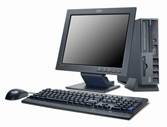
Central Processing Unit (CPU) is the main unit of computer for the data processing. It is also known as the brain of the computer system that carries out the processing of data given and provides the output.
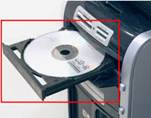
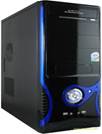 An on/off switch on the front of the cabinet is used for switch on and off the computer system. CPU assembly contains a CD Rom Drive to insert a CD into it. It has USB ports to connect devices such as Pen Drive, Mouse, mobile, etc
 Keyboard
We use hands to eat, write letters and do many activities. In the same way, computer also needs a device to get information from us. The device through which a computer gets information is called keyboard. (See Figure 1.2.3)
 Mouse
Have you ever seen a mouse? The computer mouse is also a small device like a real mouse. (See Figure 1.2.5) The mouse of a computer has a power and data chord similar to a tail which looks like a real mouse. The computer mouse is used to move the pointer on the computer screen. It can also be used to select items and draw pictures on the computer. You can also play games using a. mouse.

 Monitor
Kids!! Do you watch cartoon on the TV? (See Figure 1.2.6)
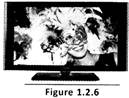 What does TV do? It shows you the images one by one...
The monitor of the computer looks like a TV screen. (See Figure 1.2.7)
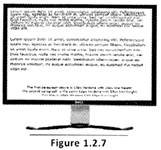 It shows words, numbers, pictures and movies on the screen. It displays all the work that you do on the computer.
 CPU
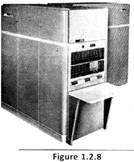
We use our brain to think and act. Computer also needs a brain to act.... (See Figure 1.2.8) The brain of the computer is called CPU. The CPU looks like a box. CPU stands for Central Processing Unit. The CPU has an ON/OFF switch and some other buttons on it. Some other parts of the computer are the speakers, printer, scanner, UPS and the joystick.



 Introduction
Look at the picture. This is a picture of a boy. His whole body is made up of various parts such as head, neck, legs hands, etc.
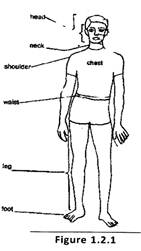 In the same way a computer is also made up of different parts.
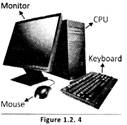
The main parts of the computer are the keyboard, Mouse, Monitor and the CPU.


You need to login to perform this action.
You will be redirected in
3 sec